Microsoft Defender XDR Deep Dive – Advanced Hunting and the Telemetry Architecture – Part 2
Building on the cross-domain correlation from Part 1: how the telemetry behind Defender XDR is structured, and how Advanced Hunting works on top of it.
In the previous section, we looked at how Microsoft Defender XDR works at a high level and how it can correlate endpoint, identity, email, and cloud telemetry around a single incident. The next logical question, however, is usually this:
„Okay, but how do you actually hunt in it??”
And this is actually where one of Defender XDR’s strongest features comes into play.
Because many users initially interact with the platform through the incident UI, the deeper capabilities of Microsoft Defender XDR become more apparent in Advanced Hunting. This is the layer where Defender XDR extends beyond traditional EDR and SIEM concepts and functions as a unified security telemetry and investigation platform.
One of the least discussed aspects of Microsoft Defender XDR is that the official documentation describes an idealized telemetry model, while Advanced Hunting reflects the operational reality of distributed ingestion.
In practice, this means:
- not all events arrive at the same time
- some signals are enriched post-ingestion
- and cross-workload correlation is inherently asynchronous
This is why absence of data in Advanced Hunting does not always indicate absence of activity — it often reflects timing or enrichment state.
And when you start working with it more seriously, something becomes apparent very quickly:
One of Defender XDR’s greatest strengths stems precisely from its ability to integrate multiple different sources of security telemetry behind a single hunting layer.
Endpoint telemetry comes from Defender for Endpoint, identity data from Entra ID and Defender for Identity, email events from Defender for Office 365, and cloud activity from various Microsoft security workloads. The Advanced Hunting schema may therefore seem extremely detailed at first glance, especially when endpoint, identity, and email telemetry all appear simultaneously in the same investigation flow.
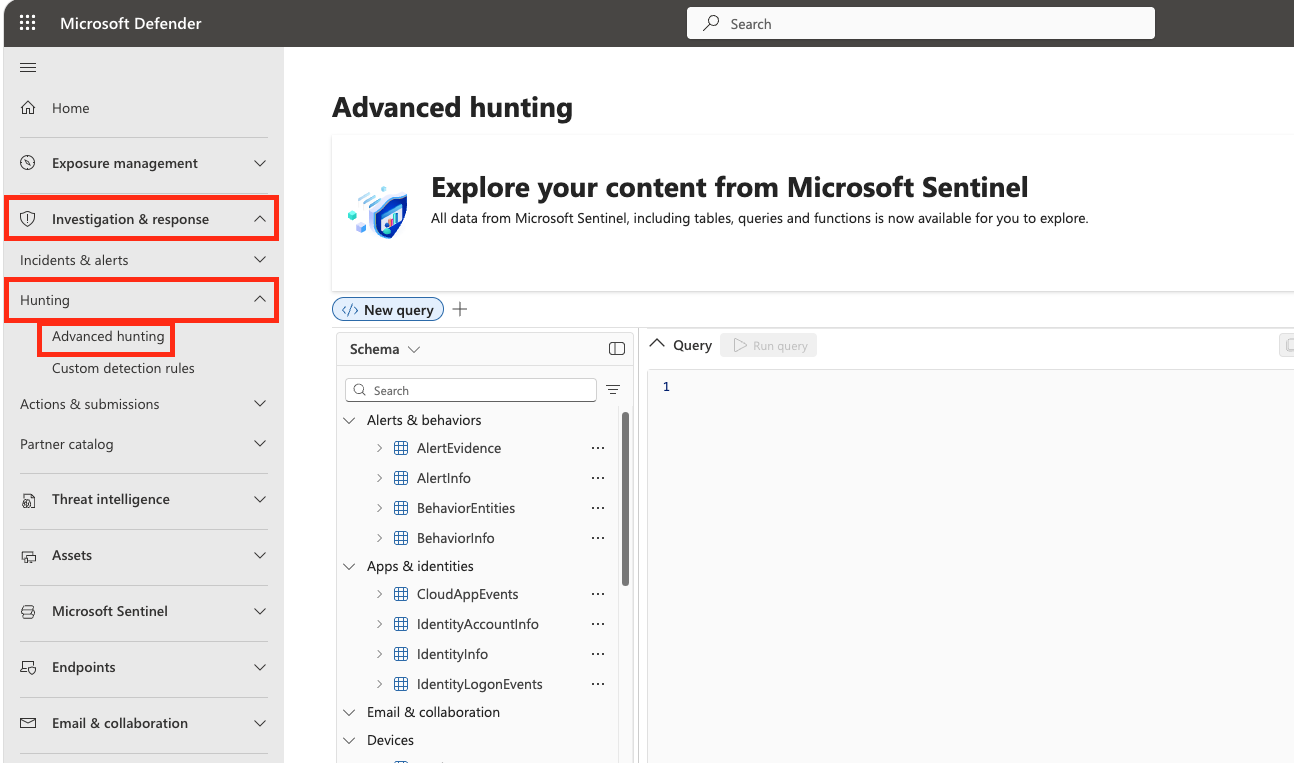
However, this is precisely what makes the platform so powerful.
Most hunting naturally starts at the endpoint, and here the Device tables form the backbone of the platform. By far the most important of these is DeviceProcessEvents. If you’ve ever worked with Sysmon or classic EDR telemetry, the structure will feel very familiar very quickly.
PowerShell execution, command-line activity, parent-child process chains, LOLBin usage, or encoded commands—practically every process-based investigation starts here.
A typical example:
DeviceProcessEvents
| where FileName =~ "powershell.exe"
| where ProcessCommandLine has_any ("-enc","DownloadString","IEX","FromBase64String")
| project Timestamp, DeviceName, AccountName, ProcessCommandLine
This is the type of query that nearly every SOC uses in some form to hunt for suspicious PowerShell activity.
What’s really interesting about Defender XDR, however, is that over time you realize: process telemetry alone is only part of the story.
DeviceNetworkEvents, for example, provide exceptional visibility into network activity. Beaconing, command-and-control communication, infrequent outbound connections, or connections to compromised infrastructure often become truly visible here.
And this is where Defender XDR feels like much more than just classic endpoint detection.
Identity telemetry is also one of the platform’s strongest features, yet in many environments it remains an underutilized capability. In Defender XDR, the identity component is not merely an add-on feature, but a key element of the investigation and correlation engine.
The IdentityLogonEvents are particularly useful:
- lateral movement,
- impossible travel,
- unusual authentication pattern,
- privilege abuse hunting
IdentityQueryEvents can be extremely valuable when investigating Active Directory reconnaissance activity. LDAP enumeration or BloodHound-like activity is often detected much earlier in identity telemetry than on the endpoint side.
This is the kind of cross-domain visibility that makes the Defender XDR hunting approach significantly different from a classic EDR workflow.
Email telemetry is perhaps the best example of how the various Defender workloads build on one another.
Many people start by searching for phishing URLs in the EmailEvents table, only to quickly realize that the detailed URL telemetry is actually found in the EmailUrlInfo table. This may seem unusual at first, but it clearly demonstrates how thoroughly Advanced Hunting represents the unique telemetry model of each workload.
A typical hunting example:
EmailUrlInfo
| join kind=inner(EmailEvents) on NetworkMessageId
| where Url has "bit.ly"
It is in these correlations that the true power of Defender XDR shines through: endpoint, identity, and email telemetry become searchable within the same hunting workflow.
As you use Advanced Hunting, you’ll come to realize that the platform’s various components are optimized for different purposes.
The timeline and Advanced Hunting, for example, do not serve the same purpose.
The timeline is primarily a visualization layer optimized for investigation workflows, while Advanced Hunting is designed for analyzing and searching large volumes of telemetry. For this reason, certain enrichments or UI-specific events may not necessarily appear the same way in KQL.
This is particularly important when performing deeper incident reconstruction or detection engineering in a Defender environment.
Another interesting aspect of the platform is how the ActionType field works. As telemetry from various Defender workloads is consolidated behind a common hunting layer, normalizing events becomes an extremely complex task.
It’s worth periodically reviewing which ActionType values appear in a given telemetry source:
DeviceProcessEvents
| summarize count() by ActionType
This goes a long way toward helping users better understand the platform’s telemetry model and detection engineering logic.
Timestamp handling is also a key part of how Advanced Hunting works. Defender XDR supports multiple time layers simultaneously:
- the time of the event itself,
- the initiating process timestamp,
- vas well as the times of ingestion and enrichment.
Since the platform operates on a global scale using distributed telemetry pipelines, certain events may arrive later or become fully searchable only after enrichment. For this reason, it is always advisable to use an appropriate lookback window when running production hunting queries.
This is particularly important in large-scale enterprise environments.
Retention is another area that should be carefully considered when designing a Defender XDR architecture. Retention periods for different telemetry types may vary depending on licensing and workload, so it is important for SOC and incident response teams to understand which data remains available for hunting purposes and for how long.
This is one reason why many enterprise environments develop a longer-term SIEM retention strategy alongside Defender XDR.
However, Advanced Hunting truly demonstrates its power when you start building custom detections on top of it.
This is where Defender XDR becomes a true detection engineering platform.
From a simple KQL query:
- alert,
- incident,
- automated investigation,
- automated response,
- device isolation workflow
For example, a typical suspicious PowerShell detection:
DeviceProcessEvents
| where FileName =~ "powershell.exe"
| where ProcessCommandLine has_any ("DownloadString","IEX","-enc")
Or a classic LOLBin search query:
DeviceProcessEvents
| where FileName in~ ("certutil.exe","mshta.exe","rundll32.exe","regsvr32.exe")
Search for token theft indicators:
DeviceProcessEvents|
where ProcessCommandLine has_any ("sekurlsa","logonpasswords","lsass")
Possible ransomware staging activity:
DeviceFileEvents
| where FileName endswith ".7z"or FileName endswith ".zip"
| summarize count() by DeviceName, InitiatingProcessAccountName
An "impossible travel"-style identity activity:
IdentityLogonEvents
| summarize Countries=dcount(Location)by AccountUpn, bin(Timestamp, 1d)
| where Countries > 3
And this is exactly where the true power of Defender XDR’s hunting model becomes apparent.
It’s not simply a matter of being able to search for endpoint events in KQL. It’s about bringing endpoint, identity, email, and cloud telemetry under a single unified investigation and detection engineering layer.
This is the capability that makes Defender XDR far more than a classic EDR platform today.
And perhaps this is also where the difference lies:
- dashboard monitoring,
- and a true threat hunting mindset.
Because the deeper someone’s understanding of how telemetry works, the more effectively they can leverage the visibility provided by Defender XDR.